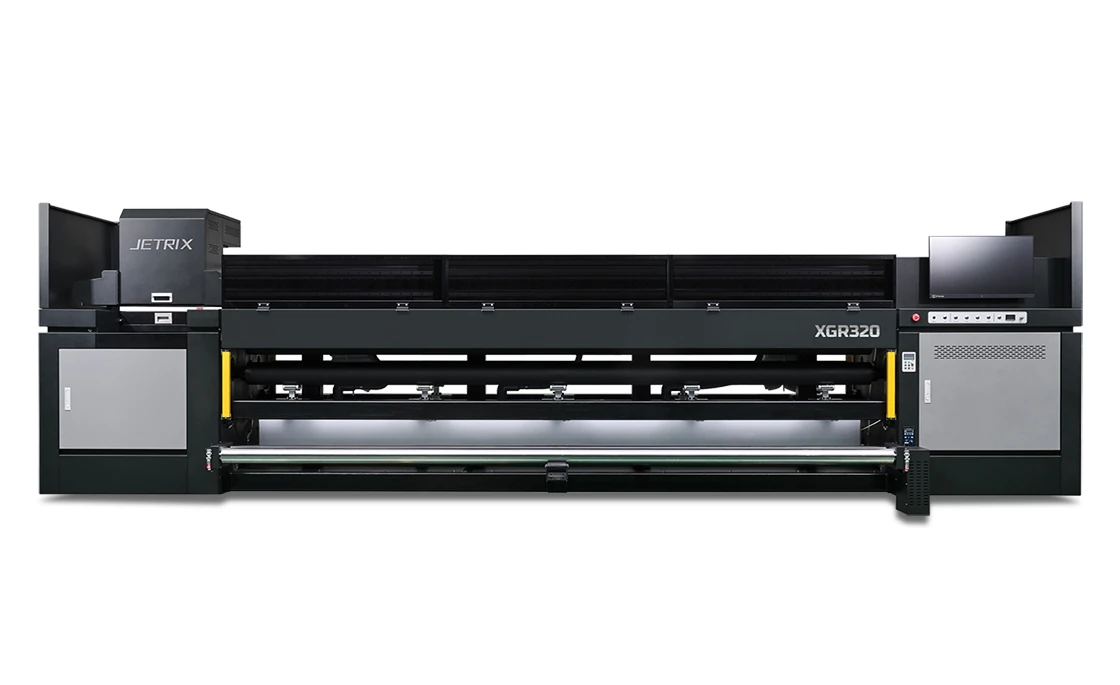
Large-format advertising
Print banners and flexible advertising media for large-format graphics, displays and signage. Within the 3.2 m print width, you can produce graphics without splitting the artwork into narrower sections.

ROLL-TO-ROLL / UV LED
3.2 metres of print width. Stable media feed.
Produce banners, films, backlit graphics and interior decoration with wide-format UV LED printing. Stable feeding of heavy rolls and a choice of printhead configurations help you match the printer to your workload.
* 114 m²/h applies to Ricoh GEN6, triple array, 2 passes and medium masking. Compare other configurations in the table below. Compare modes ↓
01 / PRINT APPLICATIONS
From everyday signage to white-ink graphics and backlit displays, choose a printer configuration that suits your media, artwork and intended result.
Print banners and flexible advertising media for large-format graphics, displays and signage. Within the 3.2 m print width, you can produce graphics without splitting the artwork into narrower sections.
Print graphics on window films and transparent media. In configurations with white ink, a white underbase helps control colour and opacity for the intended viewing direction.
Produce graphics for backlit displays and illuminated signage. Alphaset selects the print mode, colour profile and layer sequence to suit the image both in daylight and when backlit.
Use suitable flexible media and textiles for decorative and display applications. Alphaset tests the finish, ink adhesion and suitability for the intended use on your media.
The surface, finish and intended use affect ink adhesion and print durability. Alphaset selects the ink, colour profile and UV curing settings for your application.
02 / DESIGN AND CONTROL
A rigid structure and large double rollers at the front and rear help keep roll media moving steadily. Two servo motors drive the media feed, working with the roll tension control.
The media feed is designed to handle rolls weighing up to 200 kg. Choose a roll mounting and loading arrangement that suits the installation.
Print on up to three rolls side by side to make better use of the print width for narrower jobs. Alphaset confirms which roll arrangements are available for your configuration and media.
A linear motor drives the carriage, while a precision metal scale measures its position. The measurement system has an accuracy below 1 μm; this is not a dimensional tolerance for the finished print.
Tension rollers and media control features help reduce deformation and keep the surface stable in the print zone.
A collision sensor helps protect the carriage from contact with the media. Correct media loading and printer settings remain essential before each job.
The ionisation system reduces the effects of static, while white ink circulation helps maintain a stable ink supply.
03 / INK AND APPLICATION
The Ricoh GEN6 version offers CMYKWW and CMYKLcLmWW ink configurations. Light cyan and light magenta help produce smooth tonal transitions, while white ink extends the range of work on transparent and coloured media.
The XGR320 is also available with Konica Minolta 1024A printheads. The speeds and detailed specifications below apply to the Ricoh GEN6 version. Alphaset confirms the printhead and ink configuration in the quotation for your printer.
UV light cures the ink during printing. Match media handling, colour profiles, lamp settings and finishing to the substrate and its intended use.
For transparent, coloured or backlit media, plan white-ink coverage around the viewing direction. Alphaset can test your application under its intended lighting and display conditions.
Let's talk about your media04 / SPEED AND QUALITY
Choose the number of passes and printhead array to suit your production volume and detail requirements. The table compares one, two and three rows of printheads: single, double and triple array.
Scroll horizontally to compare all configurations →
| Print mode / passes | Resolution | Single array | Double array | Triple array |
|---|---|---|---|---|
| High speed / 2 passes | 726 × 300 dpi | 51 m²/h | 87 m²/h | 114 m²/h |
| Standard / 4 passes | 726 × 600 dpi | 27 m²/h | 50 m²/h | 68 m²/h |
| High quality / 6 passes | 726 × 900 dpi | 18 m²/h | 35 m²/h | 49 m²/h |
| High quality+ / 8 passes | 726 × 1,200 dpi | 13 m²/h | 28 m²/h | 39 m²/h |
All speeds are for Ricoh GEN6 with medium masking. Actual print quality and speed depend on the media, artwork, colour profile and white ink settings.
Faster modes reduce printing time, while more passes can help refine demanding graphics. Use print tests to compare detail, tonal transitions and solid colour areas alongside the throughput you need.
05 / TECHNICAL SPECIFICATIONS
Plan the printer configuration, delivery access, roll handling and installation requirements with Alphaset. The machine dimensions do not include working or maintenance space.
JETRIX / LOCAL DISTRIBUTION
For purchasing, availability and support in Slovakia, contact the local JETRIX partners.
06 / LOCAL SUPPORT
Alphaset helps you choose a printer that fits your production and supports you after installation.
We discuss your media, artwork and production volumes before recommending a printer. If your needs call for a different solution, we can help you explore other options on the market.
Every installation has its own requirements. Alphaset checks printer operation and print quality before handover.
Introductory training helps operators get started. A follow-up consultation can address questions arising from daily use. Agree the training scope and follow-up arrangements with Alphaset.
07 / FREQUENTLY ASKED QUESTIONS
Check the specifications against your artwork, media and production workflow.
No. Ricoh GEN6 and Konica Minolta 1024A versions are available. The detailed speed table on this page is for Ricoh GEN6. Alphaset confirms the full specifications for the configuration you choose.
No. This speed applies to a Ricoh GEN6 triple array configuration with 2 passes and medium masking. Other printhead arrays and print modes run at different speeds.
The XGR320 supports printing on up to three rolls at once. Alphaset confirms the roll widths and weights, required equipment and job layout for the selected configuration.
A white ink underbase helps control colour and opacity on transparent or coloured media. Alphaset confirms the layer sequence and ink coverage using your artwork and a print test.
Alphaset checks the RIP version, licence and available driver for the exact printer configuration. A name in the supported RIP list does not guarantee compatibility with every version and configuration.
08 / DOCUMENTATION
Download the Slovak A4 print brochure or the original English manufacturer’s catalogue. Both PDFs open in a new tab.
TELL US ABOUT YOUR PRODUCTION
Tell Alphaset about your media, print sizes and production requirements to discuss configuration and print tests.